
Definition of records and UO Policy
The purpose of a records inventory is to capture information about analog and digital records in UO offices. Not everything is a record. Learn more....
Why inventory records
A comprehensive inventory of records is the first step toward
- getting organized,
- saving time and effort locating information you need to carry out your work for UO, and
- meeting our legal responsibility "to ensure orderly retention and destruction of all public records, whether current or noncurrent, and to ensure the preservation of public records of value for administrative, legal and research purposes" (ORS 192.001).
What to inventory
- Identify the key activities your unit carries out and the various locations documentation of this activity is found (include vendor/hosted and third party solutions)
- All records related to any given activity are likely not found in the same place (for example, records may be found in individual or shared folders on network drives, personal computer desktops, file cabinets, an employee's office, off-site facility, vendor's servers).
- Do not reorganize your records prior to the inventory. You may want to separate out obvious "non-records". It will be easier to get organized once you have a comprehensive view of material.
- Inventory material created or received, and accumulated and maintained in the course of carrying out UO work, as you have already grouped them. Prioritize material that documents that programs and activities for which you or your unit are primarily responsible.
- Do not inventory
- at the item or document level. Example: a drawer full of budget files likely requires only one line item entry (example: enter Department Budgets, 2012-2016).
- material used only for convenience/information purposes. Examples: restaurant menus, office supply catalogs, personal material.
Preparing to inventory
Become familiar with the column headings for the inventory tool.
YOUR NAME
Enter your fist and last name.
FOLDER LABEL
Enter the name of the folder.
DESCRIPTION OF CONTENTS
What kinds of material are in the folders? What activity are they documenting?
FUNCTIONAL CLASSIFICATION
Select from the drop down the term that best describes the functions the records serve in your unit/work.
DATE RANGE START
Enter as dd/mm/yyyy; if the day and month are not known, use 01/01 as the month and the year.
DATE RANGE END
Enter as dd/mm/yyyy; if the day and month are not known, use 12/31 as the month and the year - if there are major gaps in the years then please note those in the NOTES column.
- Example: records that date from 2000-2004, and 2007-2009 would be entered as 01/01/2000 in the DATE START RANGE and 12/31/2009 in the DATE RANGE END, with a note in the NOTES column that states 2004-2007 missing. If continuing accrual of records, enter on-going.
STORAGE TYPE
Select from one of the following drop down choices
- Digital-Computer-Desktop
- Digital-Personal-Network-Drive
- Digital-Shared-Network-Drive
- Digital-Third-Party-Storage
- Digital-Enterprise-Application
- Digital-Tape
- Digital-external-drive
- Paper-Filing-Cabinet
- Paper-Other
- Paper-Maps/Plans/Drawings-Cabinets/Hangers/Rolled
- Video-CD
- Video-DVD
- Video-VHS
- Video-Other
- Audio-CD
- Audio-DVD
- Audio-Tape
- Audio-Digital
- Film-Sheet
- Film-Roll
STORAGE LOCATION DIGITAL
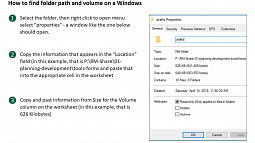
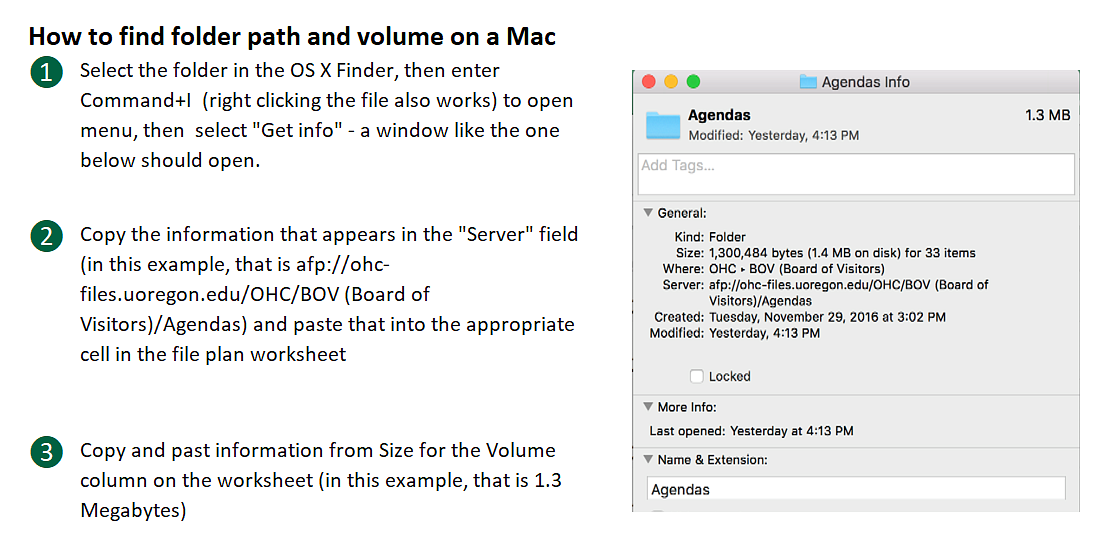
Enter letter drive and/or file path or software application name, as needed. See the section Digital, under APPROX VOLUME, below, for more information.
STORAGE LOCATION BUILDING NAME
Use the drop down to select a building name (for paper/film/other analog material).
STORAGE LOCATION ROOM #
Enter the room number.
INCLUDES VITAL?
Check this box if there are any vital records in the folder/file being inventoried. Vital records typically document delegation of authority and lines of succession and include legal documents and contracts, financial records, and other documents that establish the rights and obligations of the organization, its employees and customers, stockholders, and citizens.
Examples
- Current payroll records necessary to pay employees
- Student academic records necessary to show completion of course work
- Employee service records required for protection of tenure and retirement status
- Drawings and specifications required to repair and maintain university facilities
- Records necessary to establish university ownership of buildings, equipment, and land
- Patent license agreements
APPROX VOLUME
Enter an estimate of records in cubic feet or bytes.
When inventorying audiovisual records, provide an item count (e.g., 1200 prints, 3500 negatives) where appropriate.
Paper files
- a banker's box holds about 1 cubic feet worth of documents and files
- 1/2 a banker's box = .5 cubic feet
- 1/4 of a banker's box is approxiamtely .25 cubic feet
- 1/8 of a banker's is approxiamtely .125 cubic feet
Maps, plans, drawings, etc. (maintained in map or plan cabinets, on hangers, or in rolls). Unit is 100 items of each given size:
8” x 10 ½” 0.025
11” x 17” 0.05
17” x 22” 0.1
22” x 34” 0.2
34” x 44” 0.4
28” x 40” 0.3
28” x 50” 0.35
34” x 50” 0.45
40” x 50” 0.5
Source for the above section: California State Archives, State of California, Guide for Computation of Records Volume <http://archives.cdn.sos.ca.gov/pdf/calrim-volume-guide.pdf>
Digital Material
How to find volume and storage information on PC
How to find volume and storage information on Mac
VOLUME TYPE
- Cubic feet
- Kilobytes
- Megabytes
- Gigabytes
- Terabytes
NOTES
Include any additional information that clarifies the entry.